


Orbot: Tor for Android
4.08.44K Reviews
App Specs
- Version
- 17.9.5-RC-4-tor-0.4.9.11
- Updated On
- License
- Free
- Downloads
- 10,000,000+
- Developer
- The Tor Project
- Categories
- Communication
- Platform
- Android, iOS
Screenshots
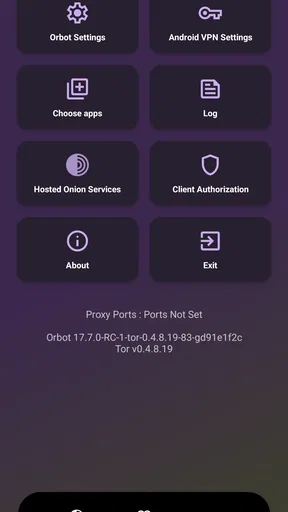
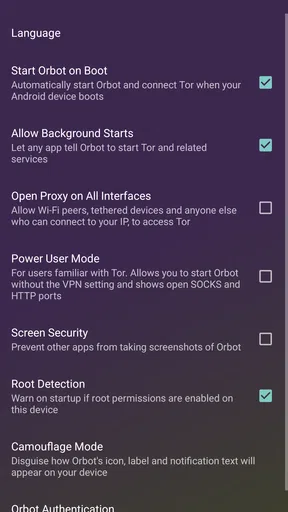
 Analysis by AppCompare
Hey there! If you've ever felt like prying eyes are watching your every move online, you're not alone. That's where Orbot: Tor for Android steps in, acting like your personal digital cloak. Let's dive into what makes this app a must-have for privacy enthusiasts.
When an ordinary connection is not enough
I think of Orbot as a tool for a particular moment, not a switch that magically makes every part of a phone private. It is a free communication app from The Tor Project, with a 4.0 average from around 198,000 ratings and over 10 million installs. It is intended for Everyone, and its current version is 17.9.2-RC-1-tor-0.4.9.5.1-1-g5efd657a1, for Android 7.0 and later. Those details make it easy to place: this is an established Android option, but it still asks you to understand what traffic you want to route and what trade-offs that choice brings.
A realistic use case is checking a news site on public Wi-Fi when you do not want your browsing to follow the usual direct route, or trying to reach information that is restricted on the network you are using. I would first decide whether the task genuinely benefits from Tor. If I only need a quick, low-latency connection for a video call, a conventional connection is the more practical choice. If the task is sensitive browsing, accepting some extra delay may be worthwhile.
Plan the route before you start
Before connecting, I recommend choosing a small, specific goal: open a page, read an article, or use one compatible app. That makes it easier to notice whether the connection is working and whether the extra privacy is useful. It also helps avoid the mistaken assumption that turning on a privacy tool automatically protects every action on a phone, including activity outside the traffic you have chosen to route.
Orbot is especially appealing to people who already understand why they might want Tor and are willing to test their setup. It can also suit travelers, researchers, and readers dealing with network restrictions. I would not recommend it as the default answer for someone who simply wants faster browsing or a one-tap replacement for every privacy setting. In those situations, the browser or service’s own privacy controls may be simpler and better matched to the job.
What is Orbot: Tor for Android?
So, picture this: you're browsing the web, and every click you make is like leaving a breadcrumb trail. Creepy, right? Enter Orbot, your trusty sidekick that uses the Tor network to keep your online activities under wraps. It’s like having a secret tunnel that keeps your internet traffic anonymous and secure.
Developed by the folks at The Tor Project, this app is designed to ensure privacy by routing your internet traffic through a series of volunteer-operated servers. This means that snoopers and trackers are left scratching their heads, clueless about your online shenanigans.
Worth Reading Before You Choose

EA SPORTS FC Mobile 26 Is a Bigger Football Game, but It Takes Time

Flipboard Shows What News Apps Must Do Beyond the Feed

Switching to Android Auto Means Rethinking Your Driving Routine

Google Calendar Makes a Crowded Week Easier to Manage

Ludo King Makes the Most of the Minutes Between Plans

Baby Panda World Brings Quick Play to Modern Phones, but Its Game Library Feels Busy
Setting Up Orbot
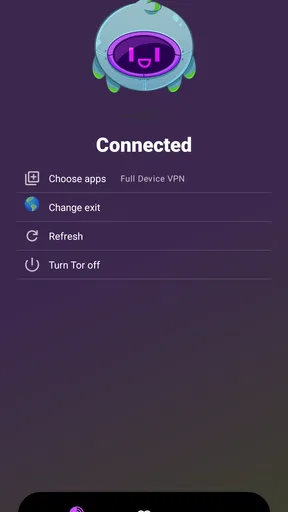
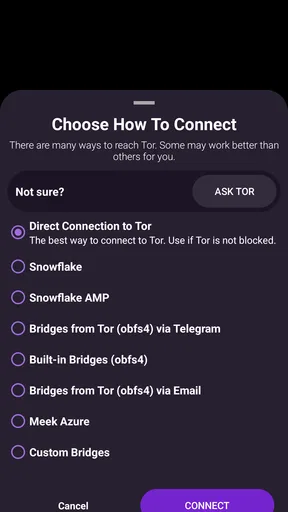
Getting started with Orbot is a breeze. After downloading it from the Google Play Store, you'll be greeted by a straightforward interface. Trust me, you don't need to be a tech wizard to get this up and running. Just follow the setup wizard, and you'll be connected to the Tor network in no time.
One of the coolest features is the "VPN mode," which allows you to route traffic from all apps through Tor, not just your browser. So, whether you're using social media, messaging apps, or even gaming, Orbot's got your back.
Using Orbot: Tor for Android
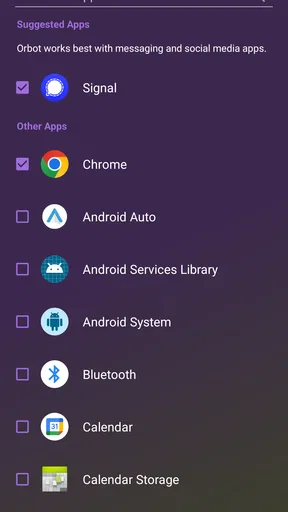
Once you're connected, navigating the app is smooth sailing. You can choose which apps you want to run through Tor, giving you control over your privacy. Plus, there's an option to "force apps" to use Tor, which is handy if you want to make sure no data slips through the cracks.
For the tech-savvy out there, Orbot provides detailed connection logs. It's like peeking under the hood of your car, only much cooler. You can see which nodes your traffic is bouncing through and monitor your network status.
Check the handoffs as well as the connection
In everyday use, Orbot is only one part of the route. I would treat the app selection as a deliberate handoff: decide which app needs Tor, enable routing for that app, then test the actual task rather than assuming that a connected status guarantees everything behaves normally. For example, if I want to read a blocked article, I would open the browser I selected and confirm the page loads before moving on to other tasks.
This distinction matters with messaging and social apps. Routing traffic through Tor does not change what you tell another person, prevent you from signing into an account that identifies you, or make the service itself forget information it already knows. If you use a familiar account while browsing through Tor, that account can still connect activity to you. I find it more useful to think of Orbot as changing a network path, not disguising every part of your identity.
A practical tip is to avoid routing everything just because the option exists. Selecting only the apps relevant to a particular task can make troubleshooting easier and reduce the chance that an app with unusual network needs will fail. If an app stops connecting, turn the problem into a simple comparison: test the same app without Tor, then with Tor, and see whether the route is the likely cause. That is more informative than changing several settings at once.
Why You Might Love Orbot
Orbot isn't just about keeping your data safe; it’s about freedom. Imagine accessing news sites or social media platforms that are blocked in your region. With Orbot, doors that were once shut tight are wide open.
Moreover, Orbot is open-source, which means anyone can inspect the code. This transparency is a big win for those who value security and want to ensure there are no funny business or backdoors.
Where it fits among privacy tools
Compared with simply browsing over a normal connection, Orbot adds a Tor route and the option to apply it beyond a browser. That broader control is its main distinction for Android users who want selected apps to use Tor. A privacy-focused browser may be easier if your only aim is web browsing; a conventional VPN may be a better fit when you want a different kind of network service or need speed and reliability for everyday streaming and calls. These tools do not do exactly the same job, so I would choose based on the activity rather than treating them as interchangeable labels for privacy.
For the blocked-news scenario, my workflow would be to connect, route the browser I intend to use, load the page, and then keep expectations realistic if it takes longer than usual. If it works, I can read and move on. If it does not, I would check whether the restriction is actually a network block or whether the site itself is rejecting the connection. That small distinction saves time: a routing tool cannot guarantee that every destination will accept every connection.
Considerations
Now, while Orbot is a fantastic tool, it's not without its quirks. The speed can be a tad slower than your usual connection, thanks to the multiple layers of encryption and rerouting. But hey, that's the price of privacy, right?
Also, not all apps play nice with Orbot. Some might not work as expected or could refuse to connect. But with a little patience and tweaking, you’ll often find workarounds.
When the flow breaks
The most common frustration is a task that becomes slower or an app that cannot complete its connection. I would not keep forcing a failing app through Tor just to preserve a setting; first decide whether that app needs the route at all. A game, for instance, may be more enjoyable on a direct connection if privacy routing is not central to what you are doing. For a sensitive reading session, slower loading may be an acceptable compromise.
There is also a difference between privacy and anonymity in practice. Tor can make the route harder to associate with your usual connection, but signing into personal accounts or sharing identifying details can undo much of the separation you hoped to create. My advice is to pair the network choice with sensible account habits: use the right app for the task, avoid assuming a login becomes anonymous, and do not treat connection logs as proof that every activity on the phone was covered.
If the question is whether Orbot works for all Android apps, my answer is no: app behavior varies, and the useful approach is to test the apps you rely on. If the question is whether it replaces a VPN, I would say not automatically; the tools have different purposes, and a conventional VPN may suit people who prioritize consistent speed or a simple whole-device connection. If the question is whether it is free, yes, Orbot is free to use. Its strongest case is for someone who values Tor routing enough to accept a little setup and occasional friction.
Final Thoughts
In a world where privacy is often an afterthought, Orbot: Tor for Android is like a breath of fresh air. It's not just about hiding from prying eyes; it's about taking control and making conscious choices about your digital footprint. With its user-friendly setup and freedom-centric features, Orbot is definitely worth a try for anyone who values their online privacy.
So, next time you’re feeling a little too exposed on the internet, remember that Orbot’s got your back. Give it a whirl and experience a new level of online freedom!
Who should keep it installed
I would keep Orbot in mind if I regularly need Tor access on Android, want to choose which apps use that route, or value an open-source tool maintained by The Tor Project. Its 8,400 reviews suggest that many people have taken the time to assess it, though the most useful test is still whether it suits your own network and apps. The version number can also help when discussing a problem with another user, since troubleshooting is clearer when both people know which release they are running.
I would skip it if I expect every app to work unchanged, need consistently fast connections, or want privacy without thinking about accounts and routing choices. That is not a flaw so much as a mismatch between the tool and the job. For me, Orbot is worthwhile when I have a clear reason to route selected traffic through Tor; for ordinary, speed-sensitive use, I would leave the extra step out.
Pros
- Enhances online privacy effectively.
- Bypasses censorship effortlessly.
- User-friendly interface design.
- Free and open-source application.
- Compatible with most Android devices.
Cons
- May slow down internet speed.
- Limited support for certain apps.
- Requires technical understanding.
- Not available on iOS devices.
- Occasional connection issues.
FAQs for Orbot: Tor for Android
What is Orbot, and how does it work on Android?
Orbot is a free proxy app that empowers other apps to use the internet more securely. By routing your internet traffic through the Tor network, Orbot anonymizes your connection, making it difficult for trackers to monitor your online activity. This ensures privacy and helps circumvent network restrictions and censorship.
Is Orbot safe to use on my Android device?
Yes, Orbot is designed with privacy and security in mind. It encrypts your internet traffic and routes it through multiple servers worldwide, making it difficult for anyone to trace your activity back to your device. However, it's essential to keep the app updated to benefit from the latest security enhancements.
Does using Orbot slow down my internet connection?
Orbot may slow down your internet connection because it routes your data through several nodes within the Tor network to ensure anonymity. Each hop can contribute to latency, but this trade-off is necessary for enhanced privacy. Users should consider whether the added security is worth the potential decrease in speed.
Can I use Orbot with any app on my Android device?
Orbot can work with a variety of apps that support proxy settings. However, not all apps are compatible. To ensure compatibility, you can use apps that are specifically designed to work with Orbot, or enable VPN mode on Orbot to route all your apps' traffic through Tor. Check app settings for proxy support.
Is Orbot legal to use, and does it work everywhere?
Orbot is legal to use in most countries, as it is a tool for enhancing privacy. However, some regions with strict internet censorship laws may restrict its use. It's crucial to understand the legal implications in your country before using Orbot. Also, some networks might block Tor traffic, limiting Orbot's effectiveness.


